
Claude Dashboards and Motion with BigQuery: A Production Walkthrough
Step-by-step Claude Dashboards and Motion walkthrough with BigQuery: connect, build a live dashboard, set IAM roles, brand it, and animate with HyperFrames.
 11:49Prefer to watch?Watch the 11:49 videoWatch on YouTube
 On this page
- 🧰 What you need
- ❓ Quick answers
- 🔌 Connect BigQuery to Claude
- 🗄️ Set up the BigQuery project and tables
- 🧭 Plan first, then build
- 📊 Build the dashboard
- Check the numbers
- 🔴 Live vs static dashboards
- 🔐 Access management with BigQuery IAM
- 🎨 Make the dashboard match your brand
- 🎬 Motion-style animation with HyperFrames
- ⚖️ Claude Motion vs HyperFrames
- ✅ Production checklist
- 🧠 My verdict
- ❓ More quick answers
- 🧭 Where to go from here
Anthropic launched Dashboards and Motion in Claude, but the launch material does not show how you would use them against a real data warehouse with real access control. This guide is the written version of my video. It is for data engineers, analysts and managers who want to see the whole path once: connect BigQuery, build a dashboard, share it, control who can see the data, brand it, and make a Motion-style animation.
By the end you will have a BigQuery project with sample tables, a dashboard in Claude that queries them, the IAM roles a teammate needs to open it, and a short animation made with HyperFrames and Claude Code.
Per Anthropic, Dashboards are in beta on paid plans and Motion is in beta on Team and Enterprise (announcement, overview). Plans change, so check those pages again before you rely on this.
Last checked: 2026-10-11. That is the day I re-read the Anthropic, Claude help, Google Cloud and HyperFrames pages linked below.
🧰 What you need
| You need | Why |
|---|---|
| A paid Claude plan | Dashboards are in beta on paid plans, per Anthropic |
| Claude Desktop | Where I connected BigQuery and built the dashboard |
| A Google account with BigQuery | To hold the sample data and manage access |
| Claude Code and HyperFrames (optional) | For the Motion-style animation at the end |
❓ Quick answers
What are Claude Dashboards? Per Anthropic, they turn questions about your data into a dashboard that stays current as the data changes. They connect to platforms such as BigQuery, Snowflake, Databricks, Amazon Redshift and ClickHouse, and to tools such as Salesforce. Anthropic positions them for quick, exploratory questions.
What is Claude Motion? Per Anthropic, Motion makes short animated explainers from a prompt. It does not use a video generation model. It animates your text, charts, shapes and images, and you can download the result as an MP4.
Can I make Motion-style animations without Team or Enterprise? Motion itself is in beta on Team and Enterprise, per Anthropic. In the video I built a similar animation with HyperFrames in Claude Code instead. It is not the same product, and the comparison section below shows the differences.
Do dashboards run live queries? They can. In my test, a dashboard whose Sources panel listed Google Cloud BigQuery was live, and one built the day before with no data source icon was static. Put "live" in your prompt so you do not depend on a default.
Who can see a shared dashboard? Anthropic's sharing page says artifacts start private, viewers need a Claude account, and an artifact that pulls from connected apps uses the viewer's connections, not yours. Details are in the live vs static section.
Which BigQuery roles does a teammate need?
Google documents roles/mcp.toolUser, roles/bigquery.jobUser and roles/bigquery.dataViewer for using the BigQuery MCP server. The table in the IAM section shows where each one is granted.
🔌 Connect BigQuery to Claude
Dashboards get their data through connectors. BigQuery has one, so the first job is to connect it.
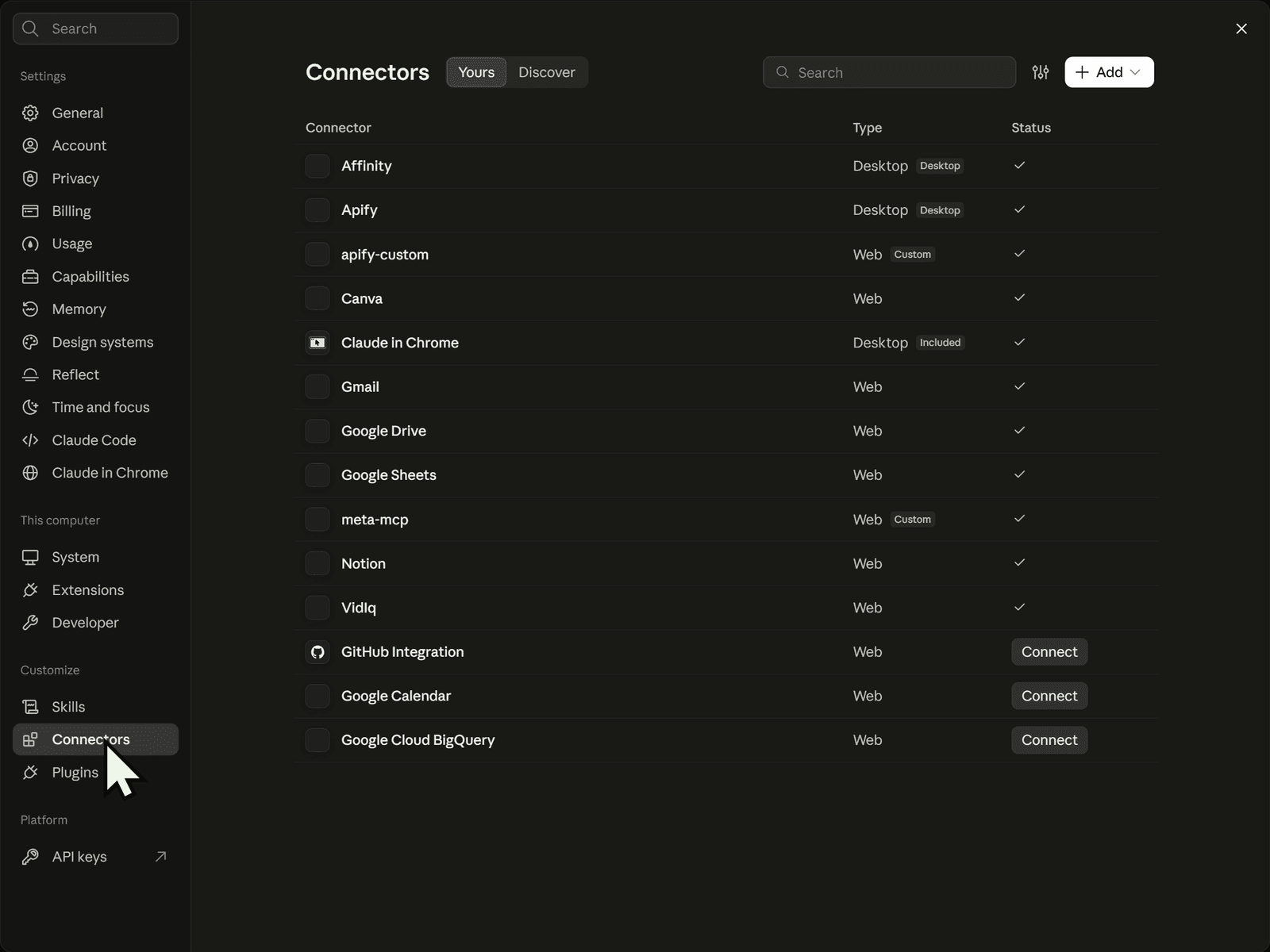
- Open Claude Desktop and go to Settings, then Connectors.
- Open Discover, search for BigQuery and click Connect. In my app the connector is called Google Cloud BigQuery.
- Pick the Google account that owns your BigQuery project and continue.
- Open the connector's page and look at Tool permissions.
On my screen the connector listed seven read-only tools and two write/delete tools: cancel_job and execute_sql. Every tool was set to Needs approval.
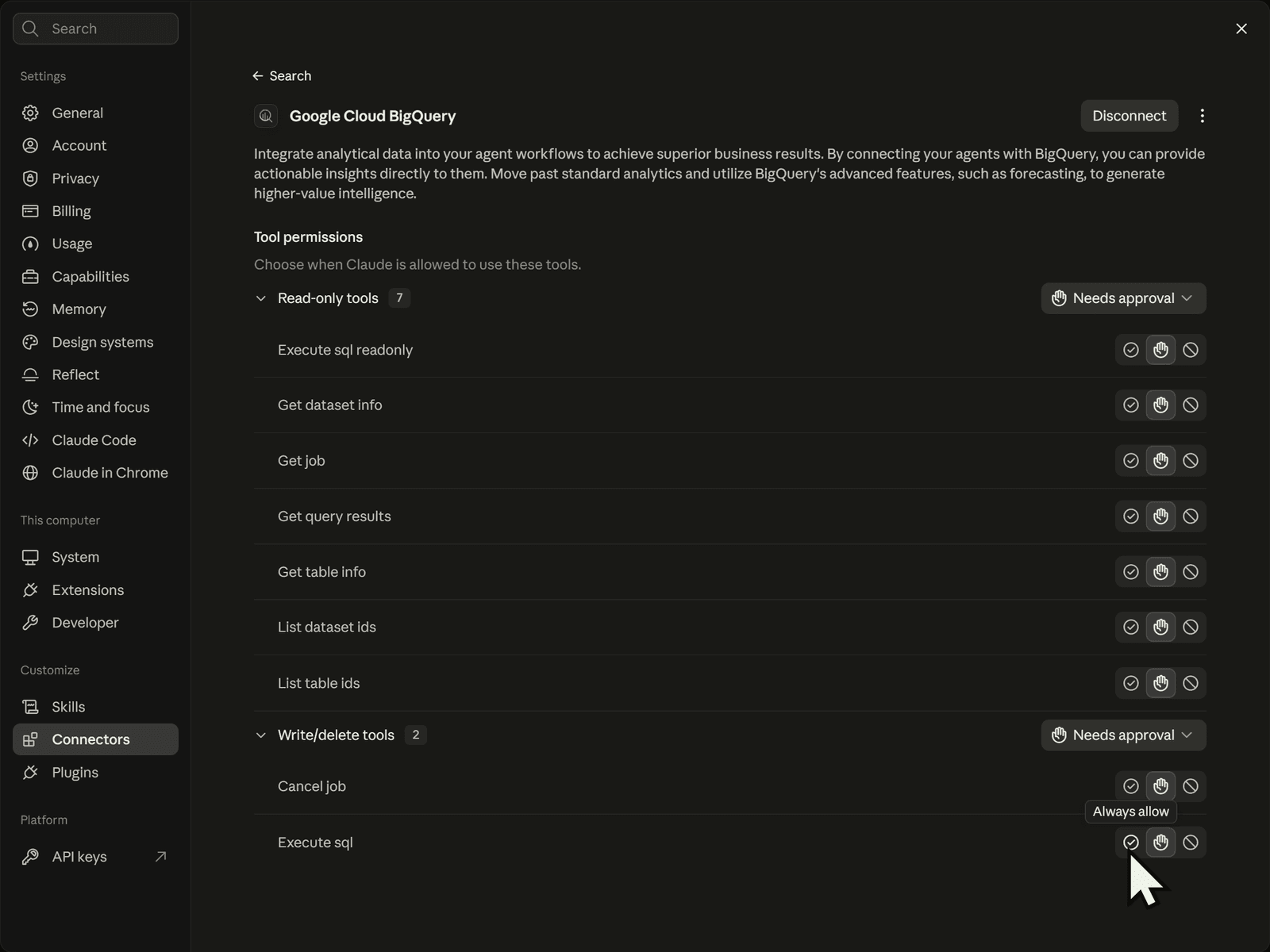
Never set execute_sql to Always allow, even in your own projects. It is the tool that can change things, so you want to read each statement before it runs. Google's documentation agrees on which tool matters: it says execute_sql is the only BigQuery MCP tool that is not read-only. A dashboard only needs reads, and the connector has execute_sql_readonly for that.
What to check: the tool counts and the approval setting on your own connector page. Google's page for the remote server lists six tools, while my Claude connector showed nine, so trust what your connector shows. Google's reference: Use the BigQuery remote MCP server.
🗄️ Set up the BigQuery project and tables
You need a Google Cloud project and some data. I copy four tables from a public sample dataset into my own project instead of querying the public dataset directly. That way the access control in the later steps is real, because I own the dataset and its IAM.
- Go to console.cloud.google.com, search for BigQuery, and use the project picker to create a new project.
- Open the BigQuery query editor.
- Replace
YOUR_PROJECT_IDwith your project id in all five statements below, then run each one. The dataset location isUS.
CREATE SCHEMA IF NOT EXISTS `YOUR_PROJECT_ID.thelook_demo`
OPTIONS (location = 'US');

CREATE OR REPLACE TABLE `YOUR_PROJECT_ID.thelook_demo.order_items` AS
SELECT * FROM `bigquery-public-data.thelook_ecommerce.order_items`;

CREATE OR REPLACE TABLE `YOUR_PROJECT_ID.thelook_demo.orders` AS
SELECT * FROM `bigquery-public-data.thelook_ecommerce.orders`;

CREATE OR REPLACE TABLE `YOUR_PROJECT_ID.thelook_demo.products` AS
SELECT * FROM `bigquery-public-data.thelook_ecommerce.products`;

CREATE OR REPLACE TABLE `YOUR_PROJECT_ID.thelook_demo.users` AS
SELECT * FROM `bigquery-public-data.thelook_ecommerce.users`;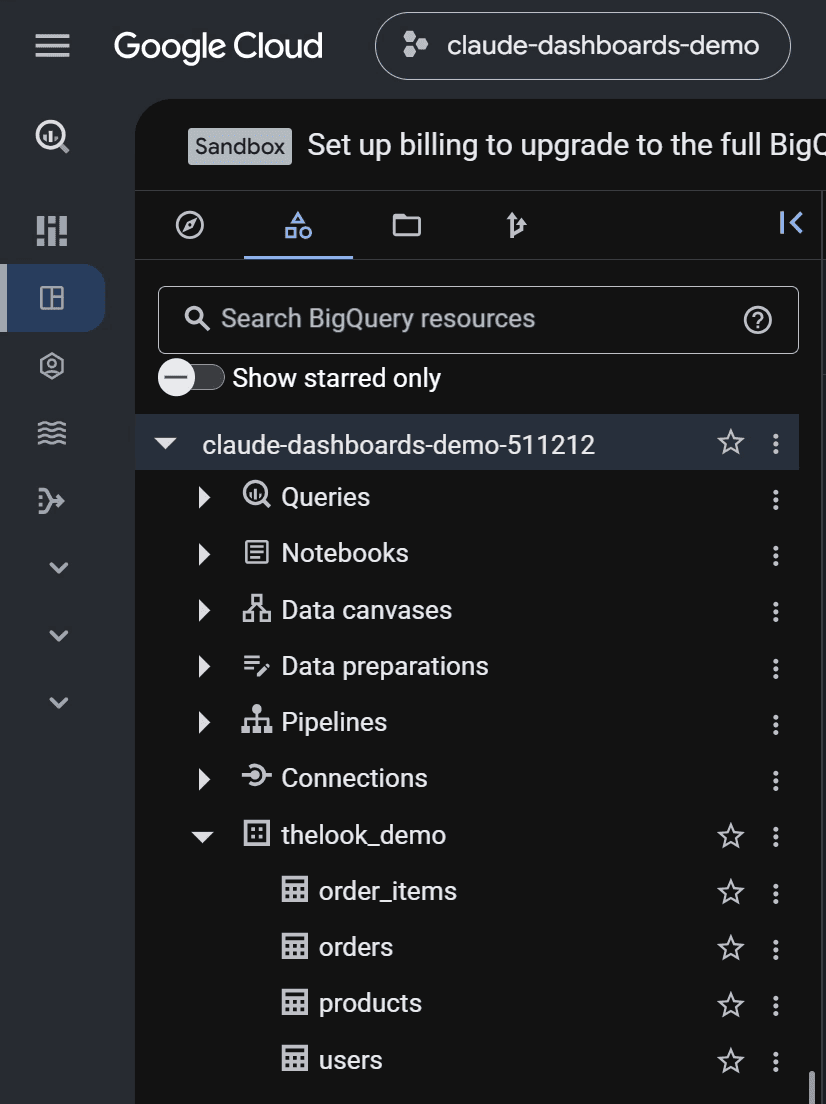
thelook_ecommerce is fictional sample data, and it is a live public dataset. The numbers in a dashboard built from it will drift over time, so do not expect to match the figures in my video.
What to check: the dataset thelook_demo expands to four tables. My project showed a Sandbox banner in the console. I did not check any pricing or limits for this setup, so look at Google's pricing page for your own project.
🧭 Plan first, then build
Before you ask for a dashboard, ask which tables the agent would use. In production you want to know what a dashboard is built on, and checking first also saves tokens on a wrong build.
Open Claude Desktop, type dashboard and press Tab to open the dashboard view. Then send this prompt, with your own project id:
Run queries in project YOUR_PROJECT_ID. List the tables in the dataset
YOUR_PROJECT_ID.thelook_demo (order_items, orders, products, users) and tell
me which you would use for revenue by month, revenue by product category,
and return rate. Do not build anything yet.
I approved the BigQuery tool call, and Claude answered with a plan.
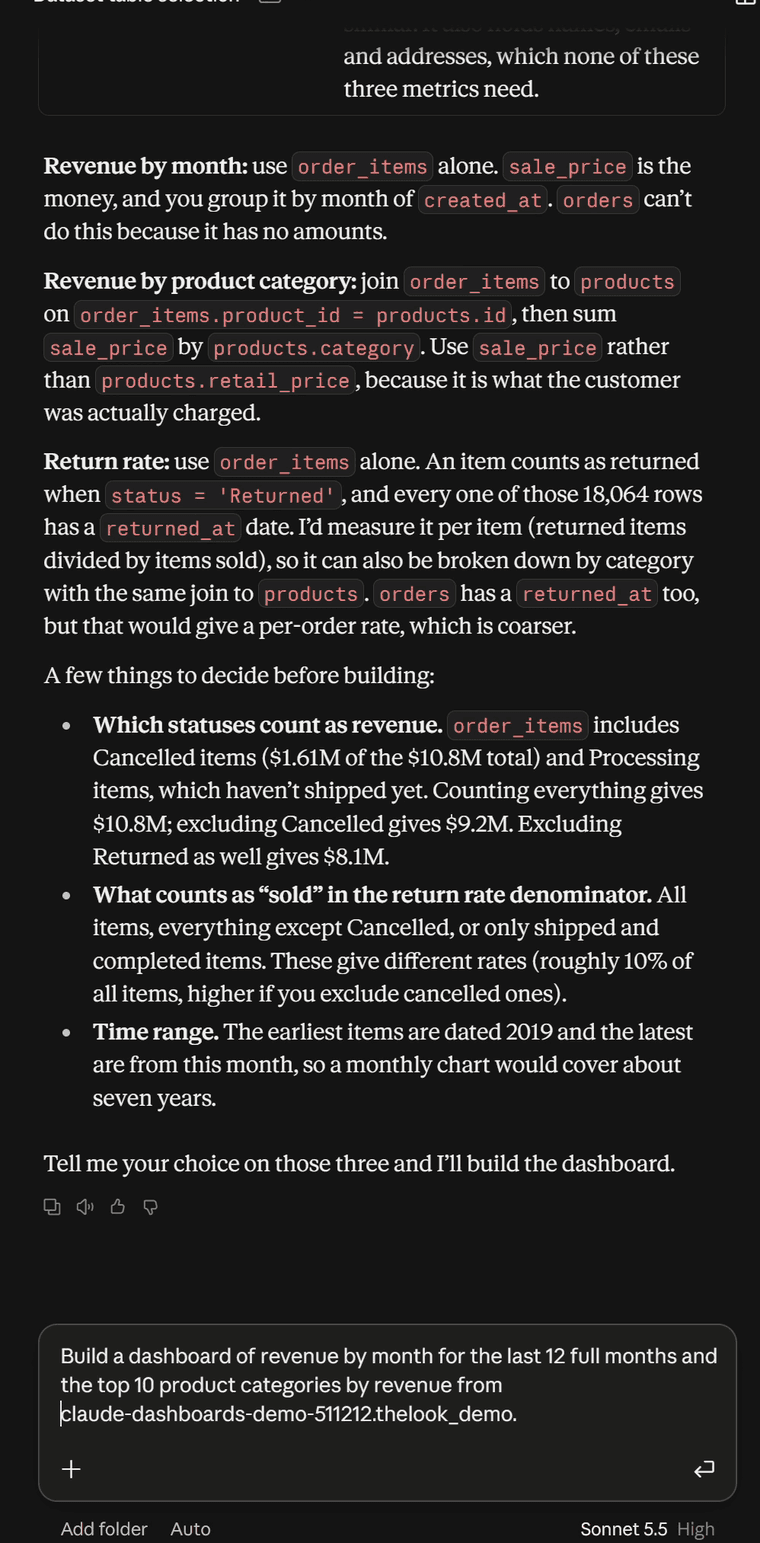
What to check: which table each metric comes from, which columns it sums, and which questions Claude asks you back, such as which order statuses count as revenue. In my demo I only skimmed it. In production I would read every line.
📊 Build the dashboard
Now ask for the dashboard. This is the build prompt I used:
Build a dashboard of revenue by month for the last 12 full months and the
top 10 product categories by revenue from YOUR_PROJECT_ID.thelook_demo.
Claude asked which order items should count toward revenue, and I chose to exclude cancelled and returned items. You can state that in the prompt yourself if you want it decided up front.
The result is an HTML file (index.html) shown as a dashboard artifact. As I said in the video, Claude could already build dashboards like this before the launch, so the difference is collaboration: the artifact can be shared with your team, who can comment and work on it with you. To change it later, ask Claude in the chat and it edits the HTML.
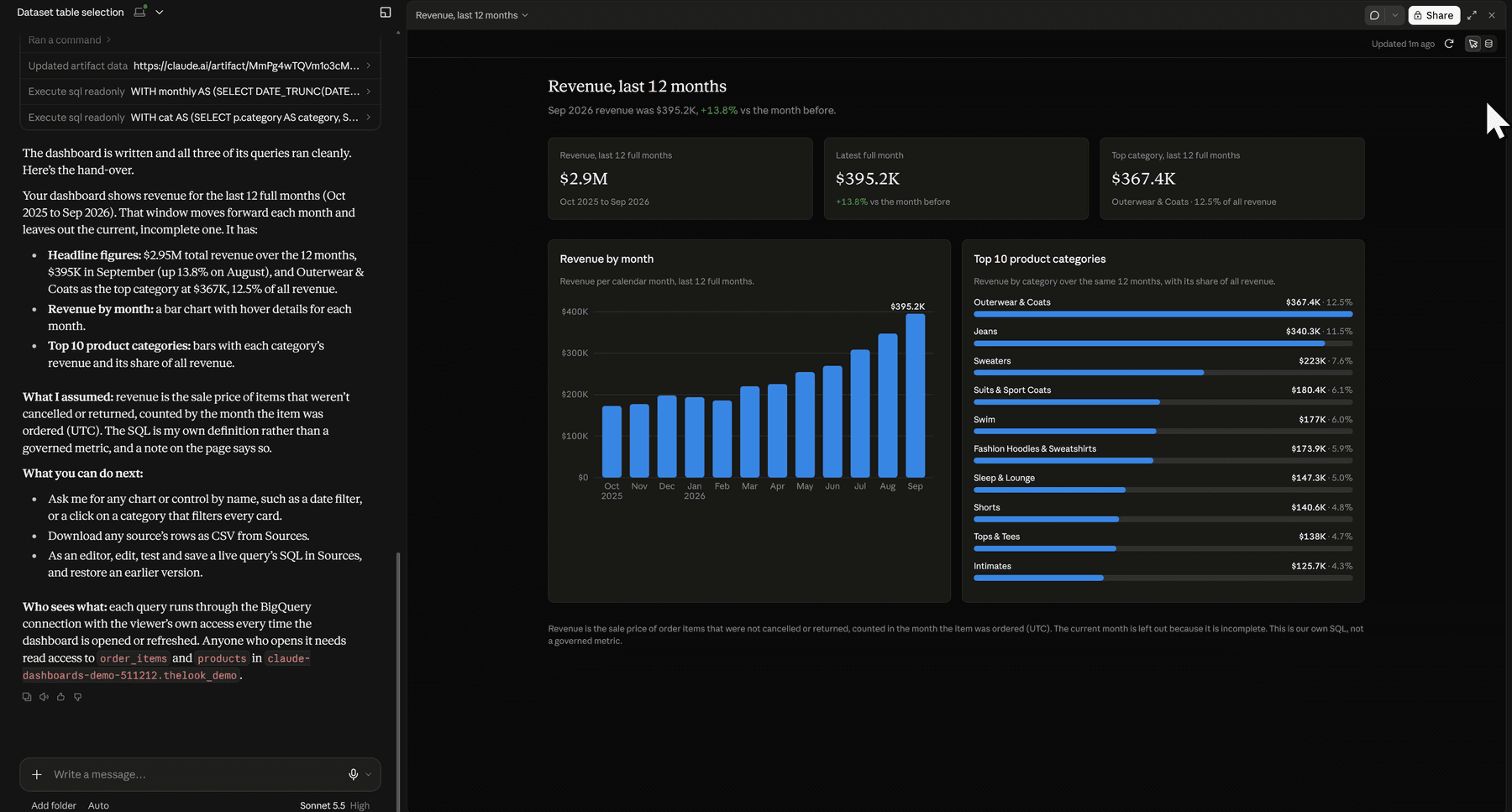
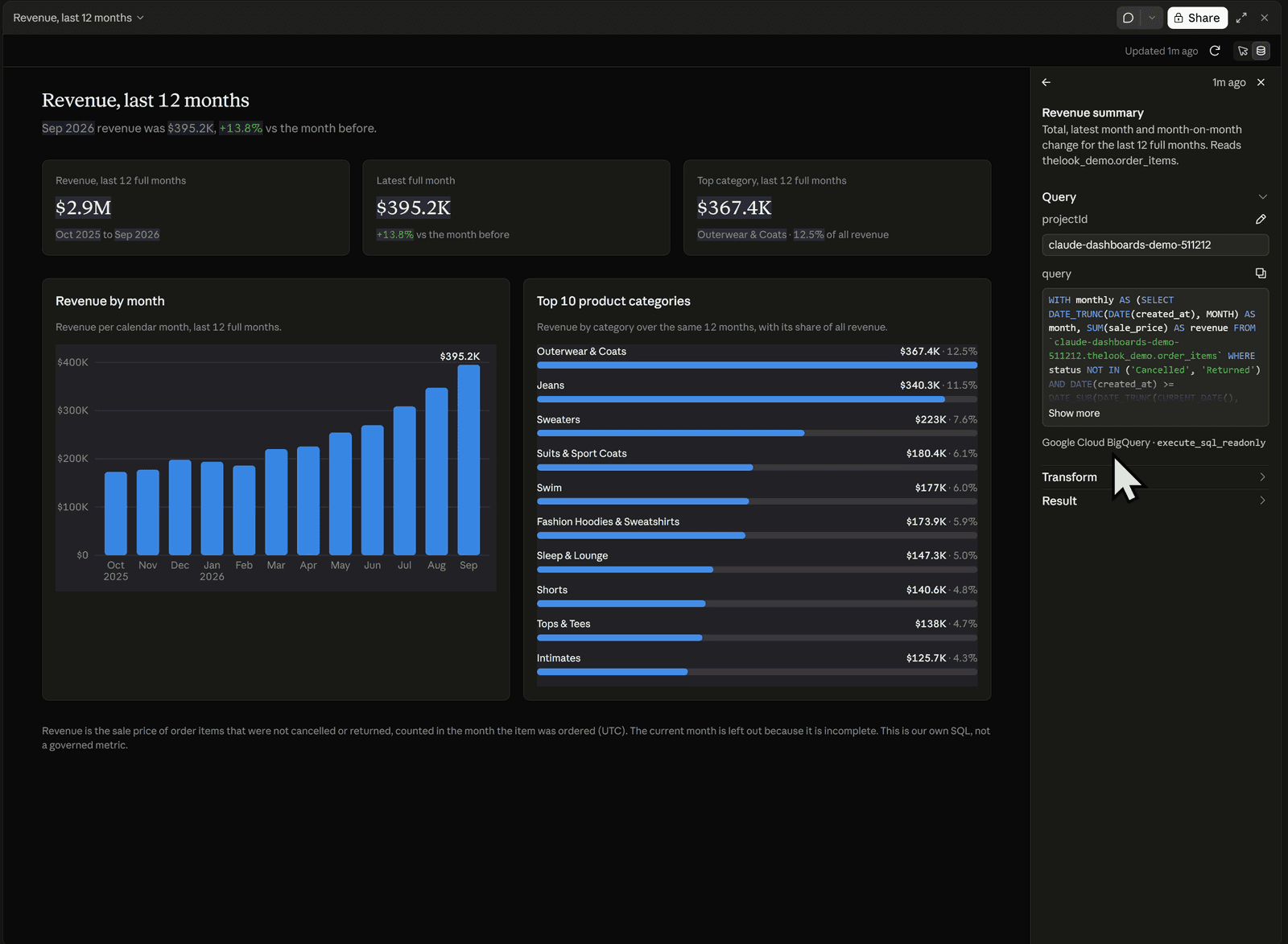
Anthropic's page says you can click any number to see the query behind it. Open the Sources panel to see where each part comes from. For each source it shows the query, the transform and the result.
Check the numbers
Read the SQL behind every chart before you send a dashboard to anyone. Two follow-up prompts help. These are not from my video; they are the habit I would use:
Explain exactly how the return rate for [MONTH] is calculated. Show the SQL
and list every assumption and every row you excluded.Check these charts for data quality problems: nulls, duplicates, and
cancelled or returned items counted as revenue. Tell me what you found.What to check: pick one number and reproduce it yourself in the BigQuery console.
🔴 Live vs static dashboards
This is the part that matters for sensitive data. A static dashboard holds saved results. A live dashboard queries BigQuery when it is opened.
What I saw (my observation, October 2026, one test): I had built a dashboard the day before that was not connected to BigQuery. It showed no data source icon. I shared it with a second Claude account on the Free plan, and that account could see the data. Then I shared the live dashboard, the one whose Sources panel listed Google Cloud BigQuery, with the same account. It showed Failed to load on every chart, and the Sources panel said Live data isn't available in this view.
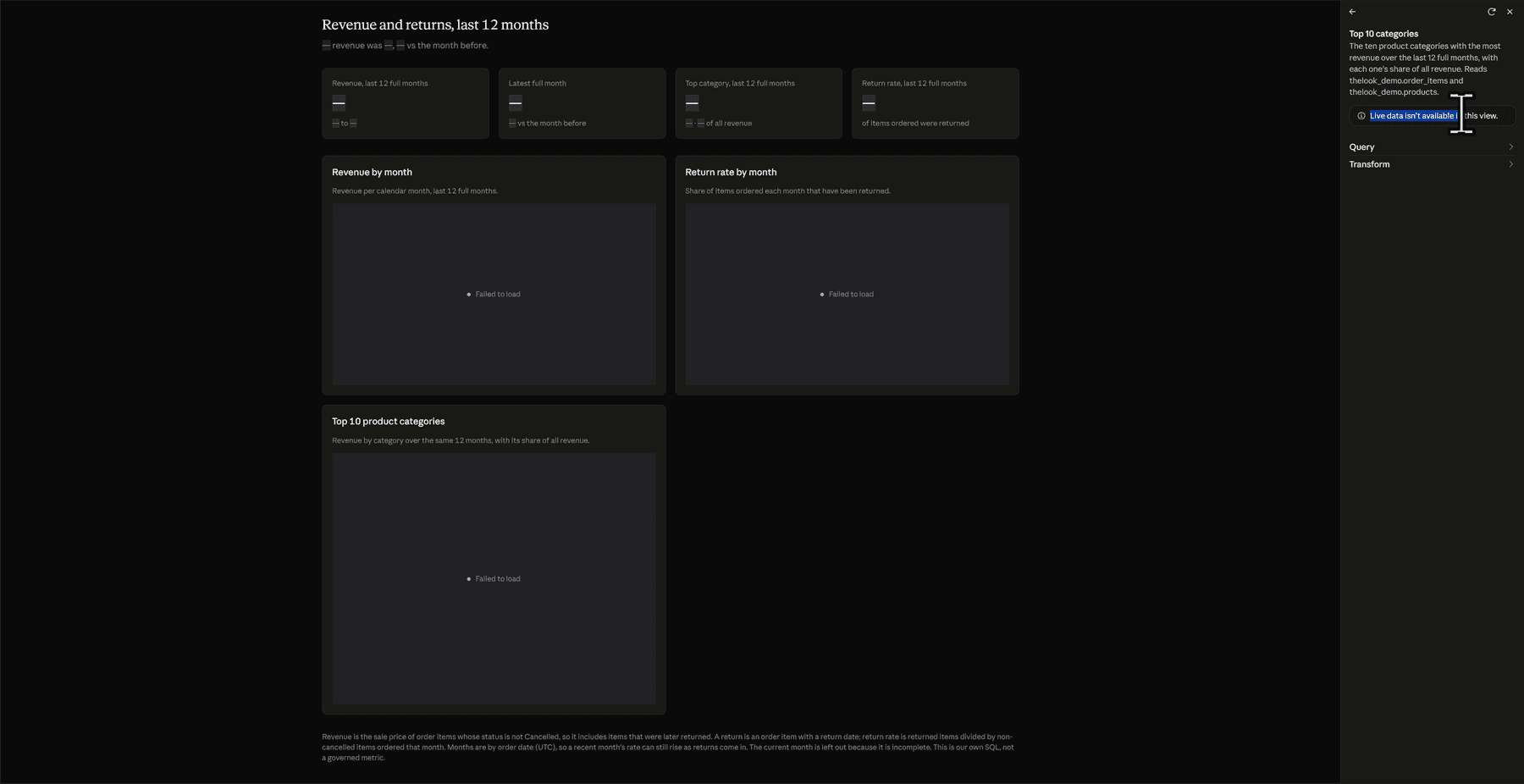
Live dashboard shared with a free account.
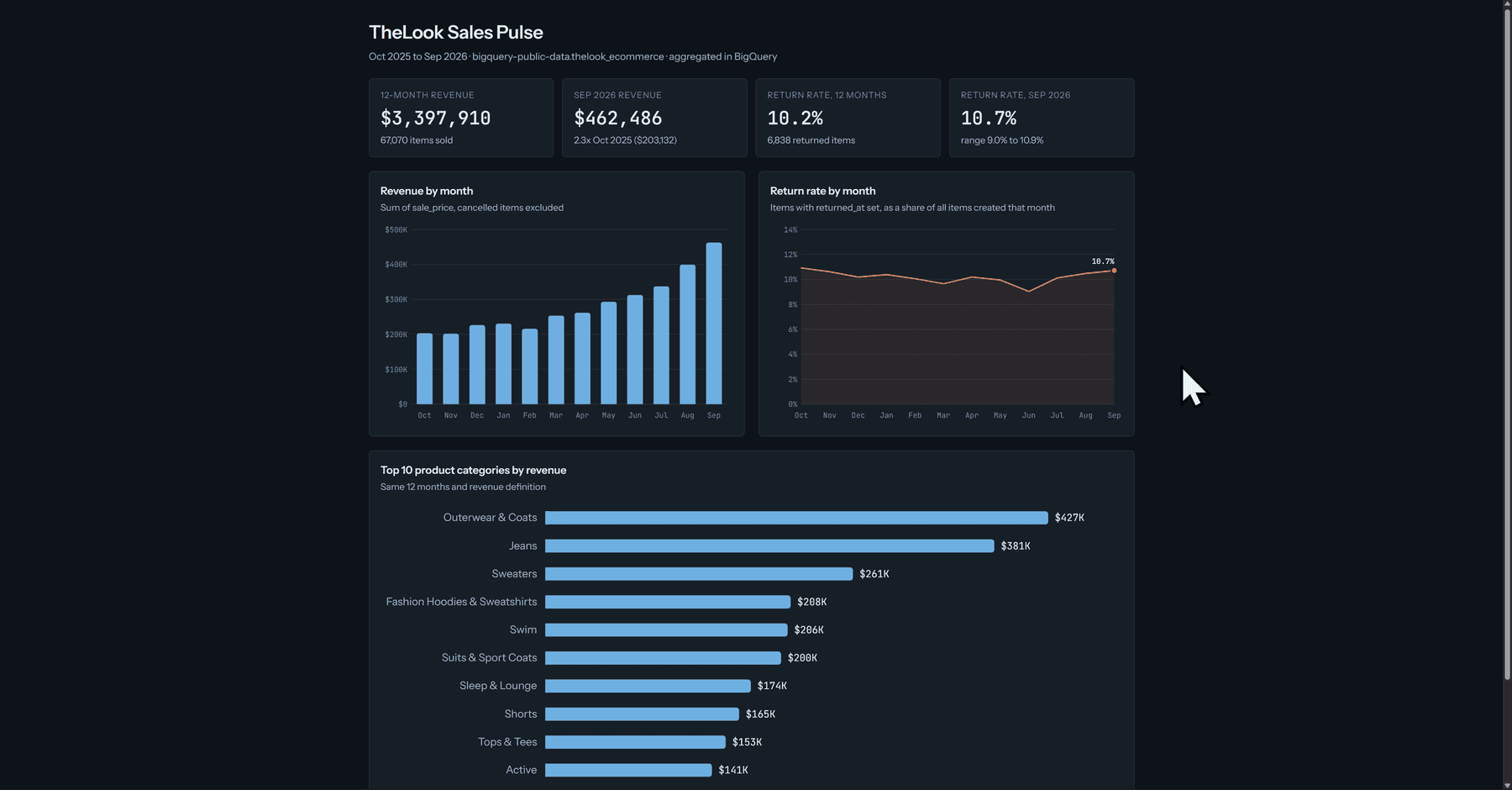
Static dashboard shared with a free account.
This is a single observation, not a documented behaviour. I did not isolate the cause. The viewer was on the Free plan, and I did not test with other plan combinations or with other accounts.
What the documentation says: Anthropic's sharing page says an artifact that pulls from connected apps uses the viewer's connections, not yours, and that if a viewer cannot access a data source, that part of the artifact shows an error instead of your data. It also says artifacts that connect to apps cannot use "Anyone with the link", and that people invited from outside your organization cannot use the parts that depend on connectors. Read it here: Share artifacts.
The practical rule: if the data is sensitive, ask for a live dashboard in the prompt, so access is decided by the viewer's own permissions rather than by a snapshot. This is the prompt from my prompt list for the live version:
Make this a live dashboard that queries BigQuery when it is opened, not a
snapshot of saved results. Run queries in project YOUR_PROJECT_ID, dataset
thelook_demo. Check the schema first. Include: revenue by month for the last
12 full months, top 10 product categories by revenue, and return rate by
month. Revenue = sum of sale_price for order items whose status is not
'Cancelled'. A return = an order item with returned_at set. Aggregate in SQL.
How to tell them apart: in my test the data source icon appeared only on the live dashboard. Claude's own hand-over note on my live dashboard also said each query runs with the viewer's access every time the dashboard is opened or refreshed. Verify that on your own dashboard.
🔐 Access management with BigQuery IAM
A live dashboard only works for a teammate who can read the data in BigQuery. That is a Google Cloud permission, not a Claude one. The console screens differ on AWS, but the idea is the same.
- In the Google Cloud console, open IAM & Admin, then IAM, on your project.
- Click Grant access.
- Under New principals, add your teammate's Google account.
- Assign MCP Tool User (
roles/mcp.toolUser) and BigQuery Job User (roles/bigquery.jobUser). - Then give them read access to the data. Either they or you open BigQuery, expand the project, click the
thelook_demodataset, then Share and manage permissions, add the account and choose BigQuery Data Viewer.
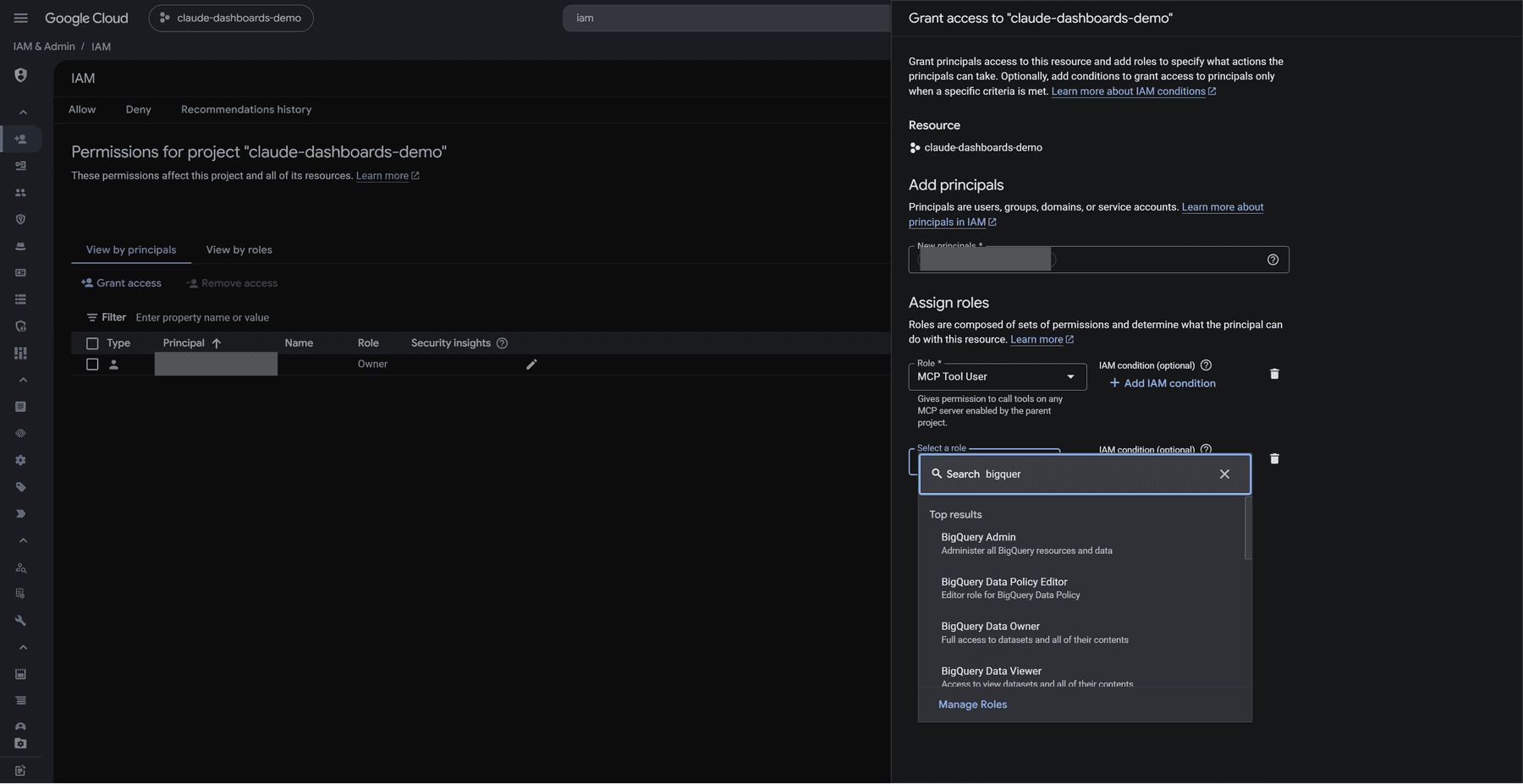
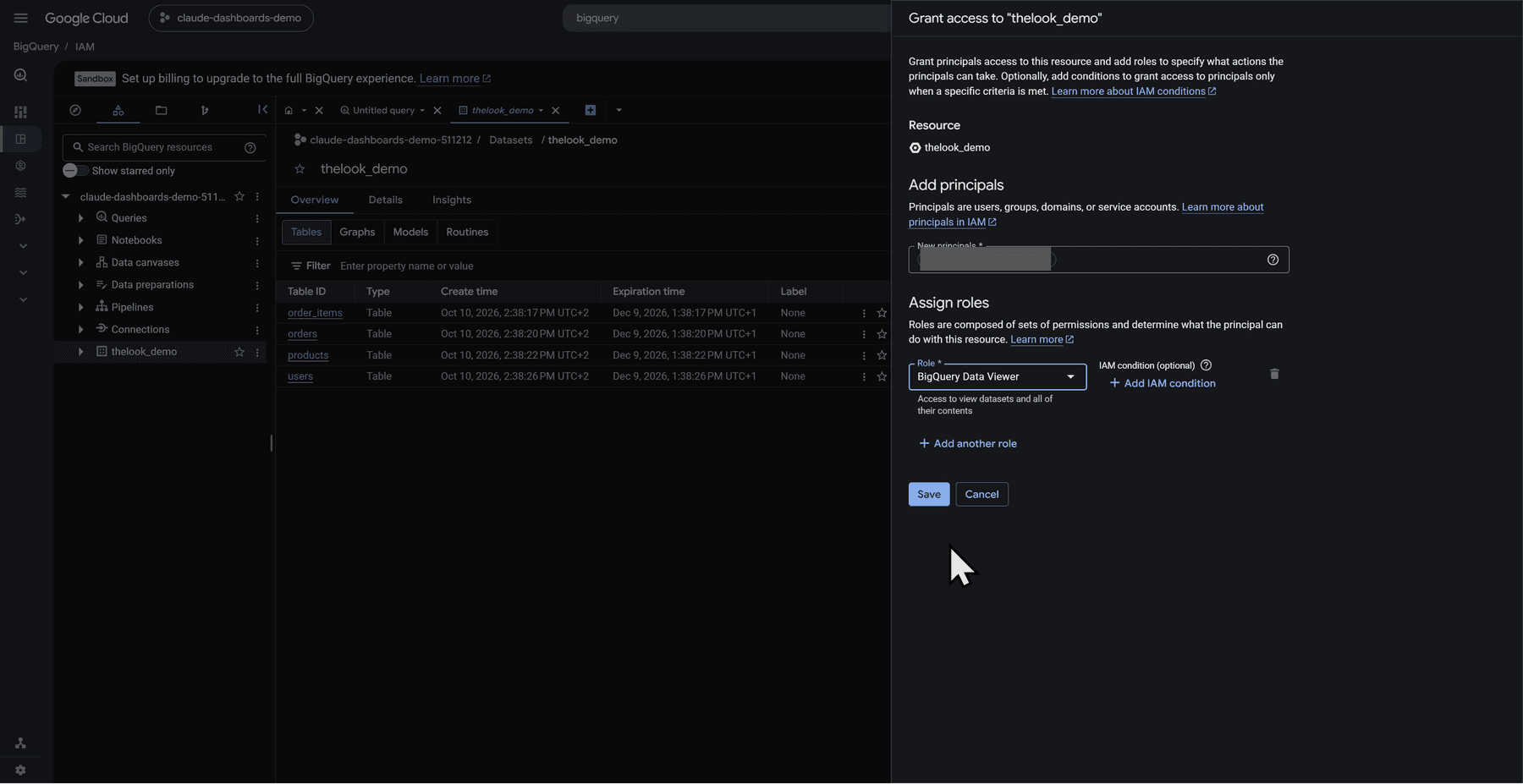
| Role | What it does | Where to grant it |
|---|---|---|
roles/mcp.toolUser (MCP Tool User) | Makes MCP tool calls | On the project, per Google |
roles/bigquery.jobUser (BigQuery Job User) | Runs jobs, including queries, within the project | On the project, folder or organization only. It cannot be granted on a dataset or table |
roles/bigquery.dataViewer (BigQuery Data Viewer) | Lets the user query the data | On the dataset in my demo. Google says it can be granted on a dataset, table, view or routine, or higher up |
Sources: Use the BigQuery remote MCP server and BigQuery roles and permissions.
Follow least privilege in production. In my demo I granted BigQuery Admin on the project, which is much broader than needed. I only did that because it was a throwaway demo account. Do not copy that part.
I did not test row-level or column-level security in this video.
🎨 Make the dashboard match your brand
Dashboards are an HTML file underneath, so Claude can restyle one. I used my own DESIGN.md to make the dashboard look like my brand. You can do the same with yours: add the DESIGN.md file to the prompt, or describe your colours, fonts and card style in the prompt itself. Anthropic's pages that I read do not say Dashboards apply a saved design system, so the style has to come from what you put in the chat.
A style prompt that covers your canvas and text colours, card style, chart colours and fonts is enough to start. Ask Claude not to invent numbers while it restyles.
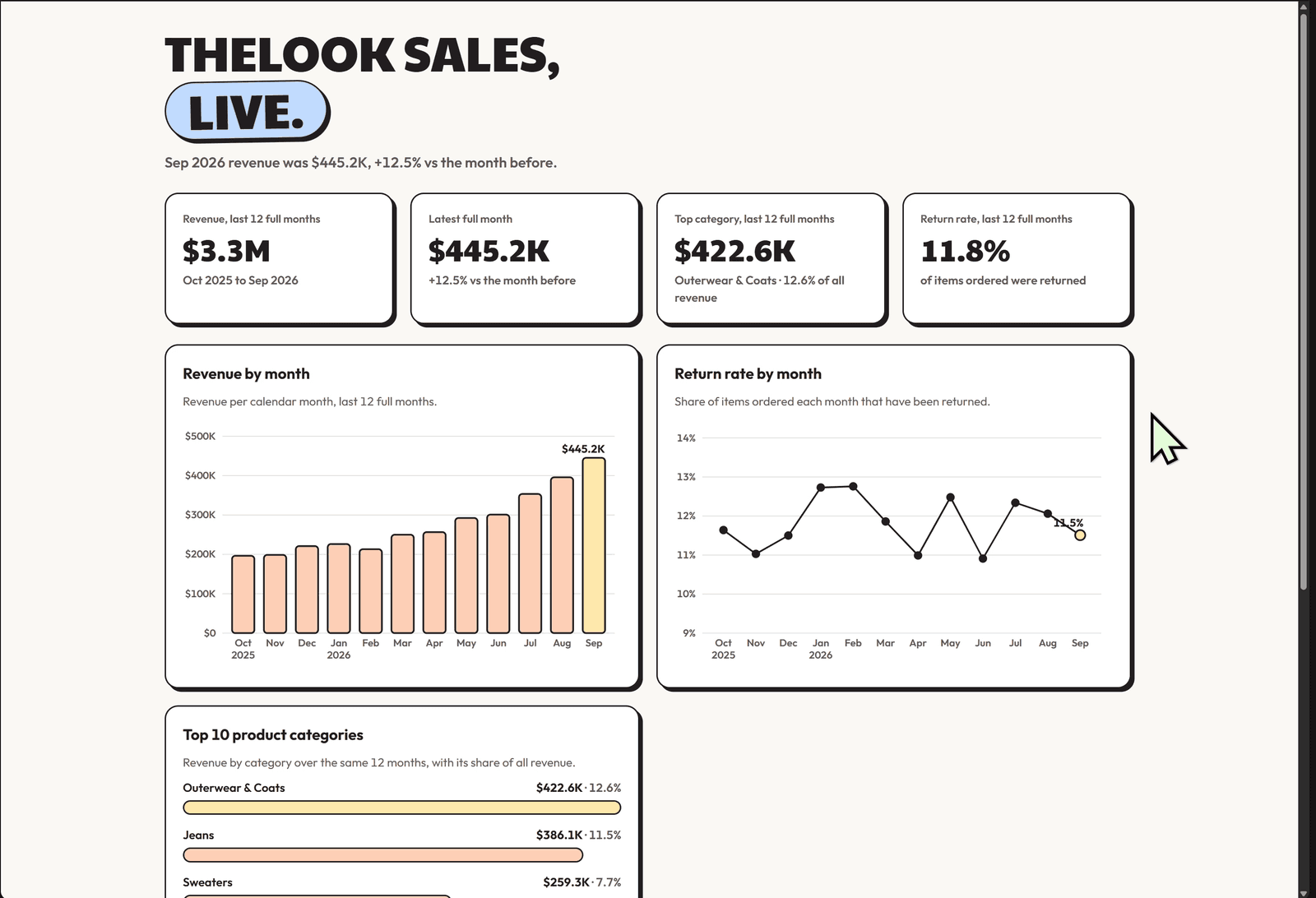
What to check: Claude's reply told me it had not opened the page to check how it renders and that the fonts were the part it was least sure of. Open the dashboard yourself after a restyle.
🎬 Motion-style animation with HyperFrames
Claude Motion is limited to Team and Enterprise, so for the last part I used HyperFrames. Its README describes it as an open-source framework that turns HTML, CSS, media and seekable animations into MP4 videos, under the Apache 2.0 license. Rendering runs locally, and it needs Node.js 22 or newer and FFmpeg.
Install. In Claude Code you can paste the repository link and ask Claude Code to install HyperFrames for you, which is what I did. The README gives these commands for Claude Code:
claude plugin marketplace add heygen-com/hyperframes
claude plugin install hyperframes@hyperframes
Prepare a project folder. Create a fresh folder and put your own DESIGN.md in it if you want the animation to follow your brand. Without one, Claude Code will pick a design itself. In my run I also attached DESIGN.md to the chat.
Run the prompt. I used Opus 5.5 with medium effort, with the BigQuery connector enabled in Claude Code. This is the generic version of my prompt:
Run queries in BigQuery project YOUR_PROJECT_ID using the BigQuery
connector. Dataset: YOUR_PROJECT_ID.thelook_demo (order_items, products).

Step 1, get the data. Read-only queries, last 12 full calendar months
(exclude the current month):
1. Revenue by month. Revenue = sum of sale_price for order items whose
   status is not 'Cancelled'.
2. Return rate by month. A return = an order item with returned_at set.
   Return rate = returns / all items that month.
3. Top 10 product categories by revenue (same revenue definition).
Show me the SQL and the result tables before you animate anything.

Step 2, animate. Using /hyperframes, make a 30-second 1920x1080 animated
explainer, no audio, from only those results. Follow DESIGN.md in this
folder as the brand. Every number on screen must come from the query
results. Do not invent or round values beyond formatting.

Don't ask me setup questions. Pick sensible defaults, tell me what you
chose, and render an MP4 locally.
The prompt I actually pasted on camera was a longer, scene-by-scene version for my own brand. It follows the same two steps, and you can see it in the video.
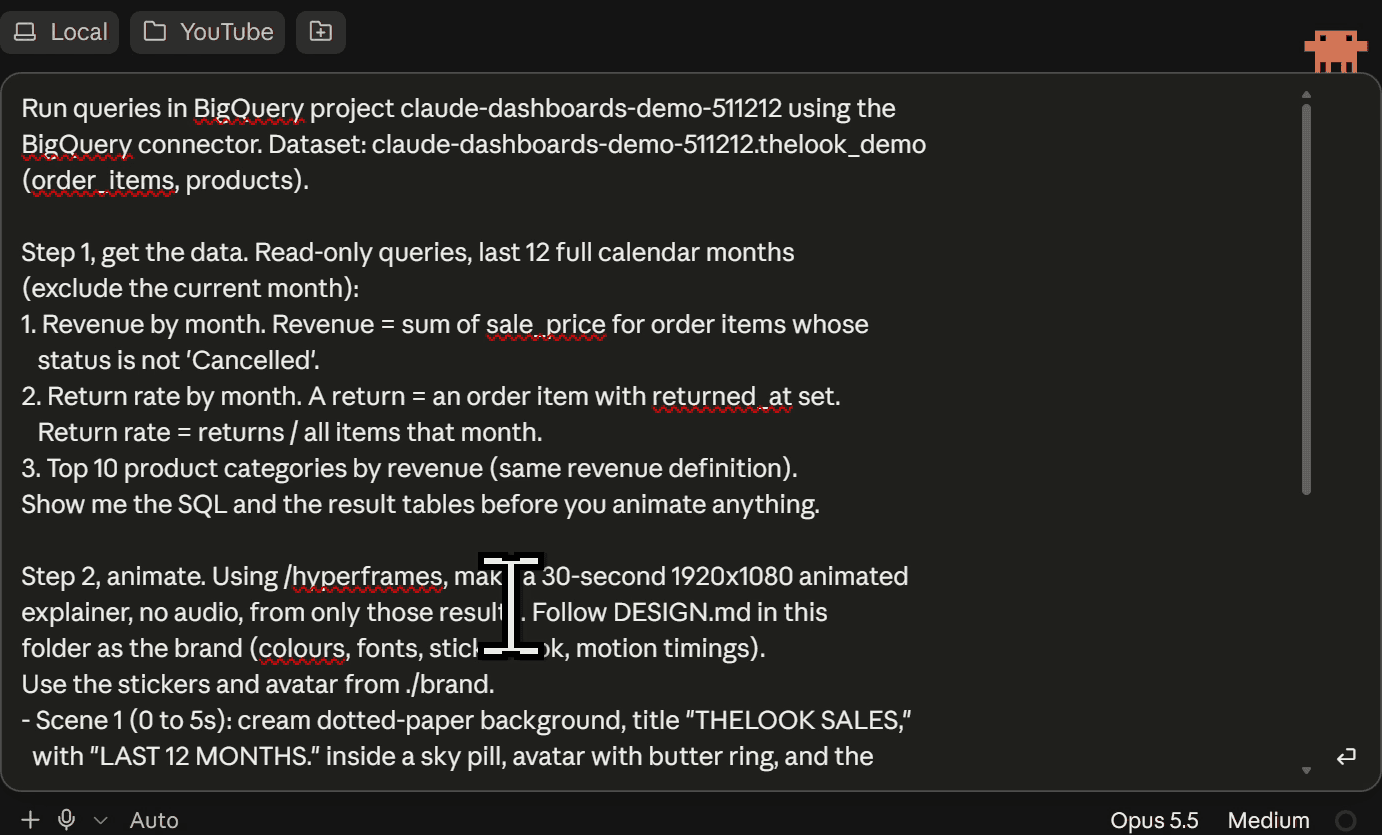
Claude Code ran the queries, showed the SQL and result tables, and then rendered the video. These are frames from my render:
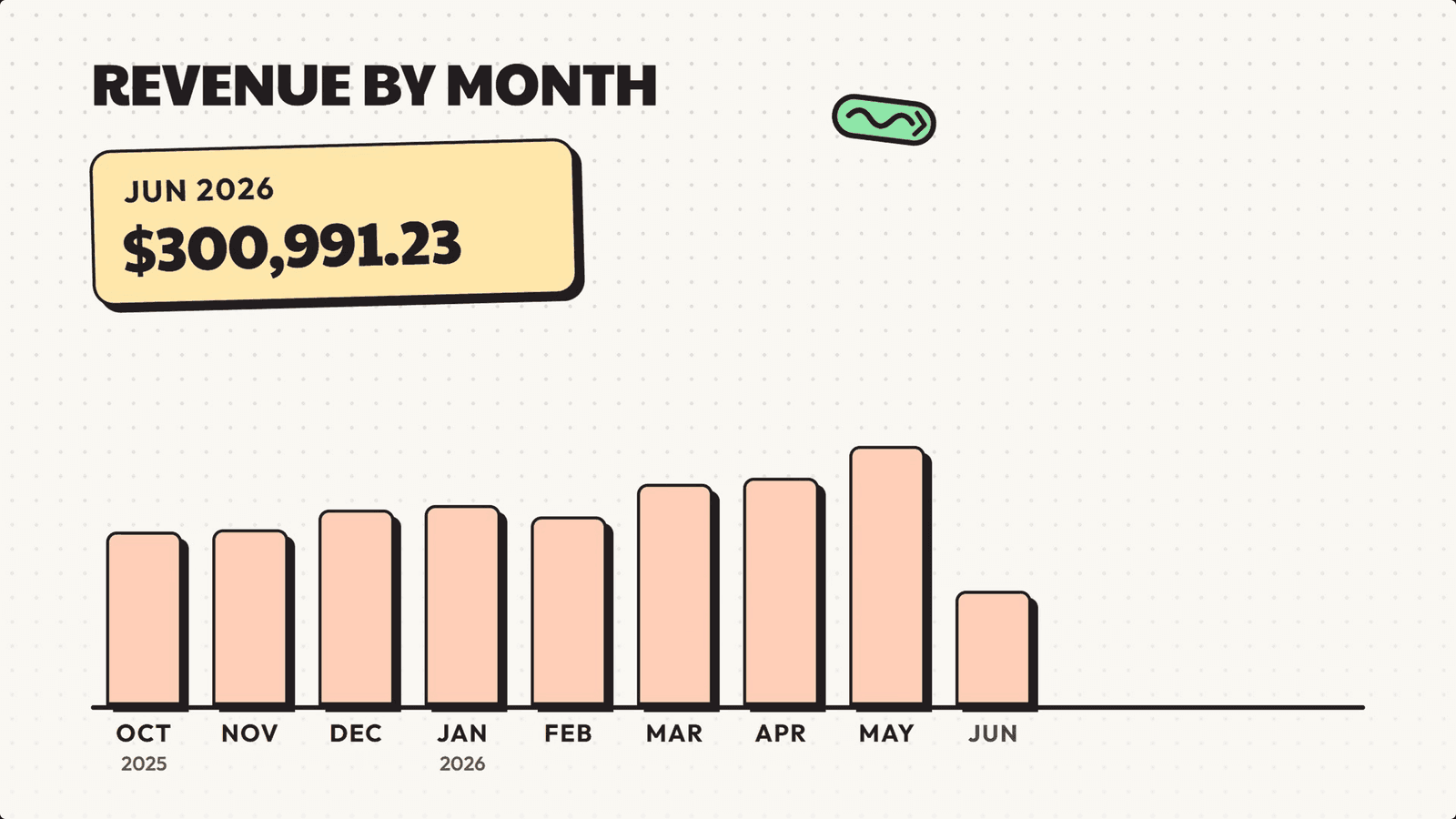
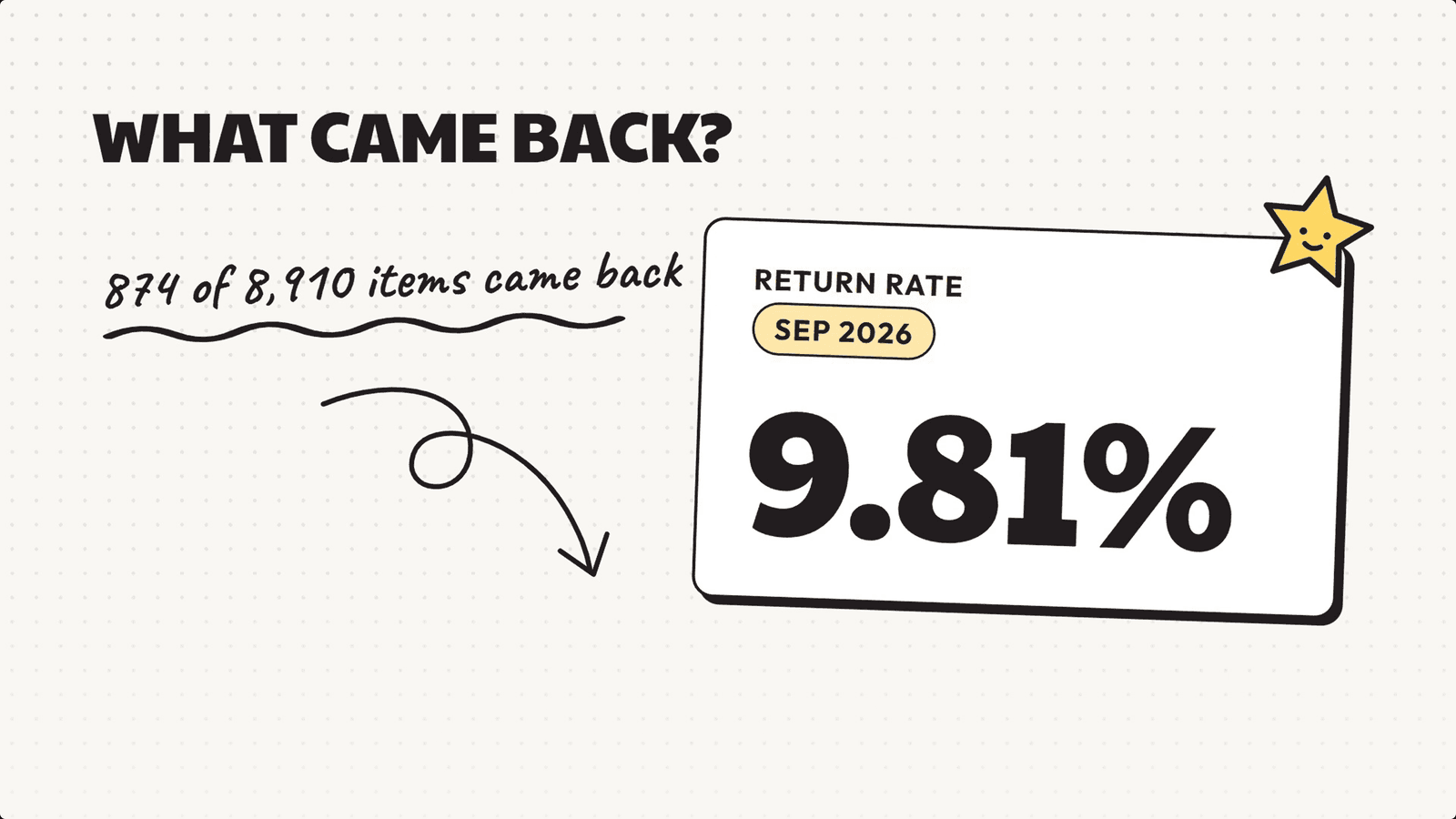
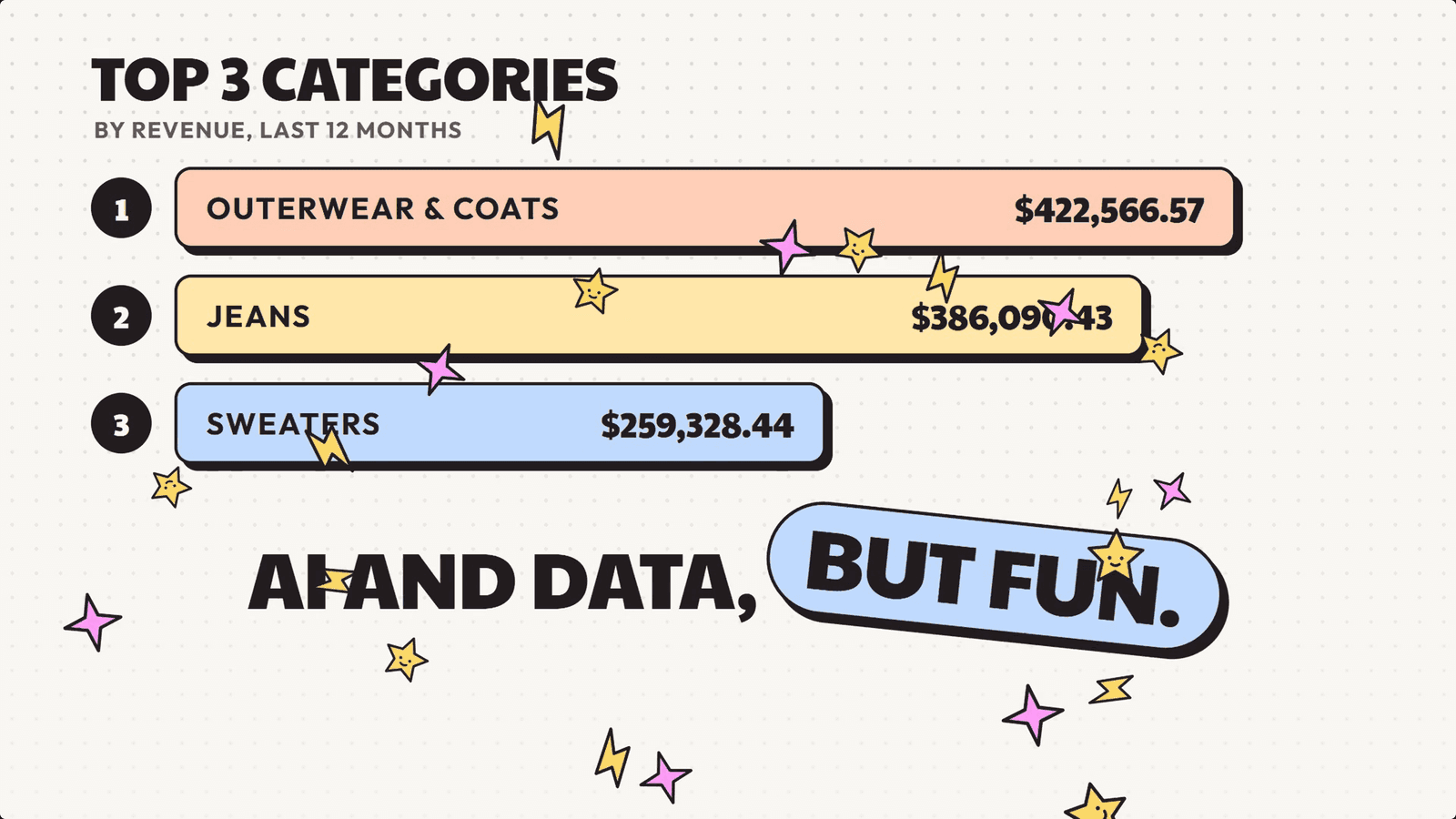
My render has no music because I did not connect ElevenLabs. I said in the video that connecting it to Claude Code could add music, but I did not test that.
What to check: every number on screen should match the result tables Claude Code showed you before animating.
⚖️ Claude Motion vs HyperFrames
I did not test Motion itself, so the Motion column comes from Anthropic's pages and from what I said in the video. The HyperFrames column is what I saw.
| Claude Motion | HyperFrames with Claude Code | |
|---|---|---|
| Availability | Beta on Team and Enterprise, per Anthropic | Open source, runs locally, I ran it from Claude Code |
| Editing | Built-in editor, and per Anthropic you can also ask Claude to change words, numbers and timing. I described pausing a frame and telling Claude the data is wrong | No frame editor. You ask Claude Code to change it, and in my run that meant regenerating the animation |
| Link to the dashboard | Tied to the dashboard, so when the dashboard changes the motion changes, as I described | Not tied. It is a separate project that you rerun |
| Sharing | Shared as an artifact that teammates can edit | A finished MP4 you share. Teammates can build their own from the same data |
| Output | Downloadable MP4, per Anthropic | Rendered MP4 |
My position: HyperFrames is a close alternative, not a replacement. The ease of collaboration is lost. Motion has the built-in editor, the link to the dashboard and artifact sharing.
✅ Production checklist
- Approve
execute_sqlper call. Never set it to Always allow. - Use least-privilege IAM. Start from the three roles in the table, not from Admin.
- Use a live dashboard, not a static one, for sensitive data.
- Read the SQL behind each chart before you share.
- Cross-check one number by hand in BigQuery.
- Remember that live dashboard queries run with the viewer's own access, per Anthropic's sharing page, so viewers need access to the underlying data.
- Share only with people who are allowed to see the data.
- Know what I did not test (below).
What I did not test: row-level and column-level security, scheduling, alerting, a shared metrics layer, Claude Motion itself, and data sources other than BigQuery. If you tested any of these, tell me in the comments of the video.
🧠 My verdict
Does this replace BI tools like Tableau or Looker? I don't think so. Anthropic itself describes dashboards as being for quick questions, and you can see that in the video. You can use them as a complement, because per Anthropic's pages you can send dashboards on to tools such as Grafana, Hex, Omni, PostHog and Sigma for deeper analysis. Anthropic lists Looker and Tableau as coming soon, so analysts and BI people are still needed.
I also do not want to give you the false idea that HyperFrames replaces Motion. Open-source projects are quick to copy premium features, though, so I would not be surprised if something like Motion shows up open source soon. That is my opinion, not a fact.
Three things to remember: ask for a live dashboard in your prompt, open the query behind every number before you send it up the chain, and share only with the people who are allowed to see the data.
❓ More quick answers
What is the difference between a live and a static Claude dashboard? A static dashboard holds saved results. A live one queries BigQuery when it is opened. In my single test, only the live one showed a data source icon, and only the static one loaded for a second account on the Free plan. That is one observation, not a rule.
Why shouldn't I set execute_sql to Always allow?
It is the BigQuery MCP tool that is not read-only. Keep it on Needs approval so you read each statement first.
Can a teammate open my live dashboard without BigQuery access? Per Anthropic's sharing page, a connector-backed artifact uses the viewer's connections, and if the viewer cannot access a data source, that part shows an error. So give them the BigQuery access described in the IAM section.
Which roles do I give them?
roles/mcp.toolUser and roles/bigquery.jobUser on the project, plus roles/bigquery.dataViewer on the dataset, as in my demo.
Does Claude apply my design system to dashboards? Anthropic's pages that I read do not say so. Put the style in the prompt.
Can I make the animation without Motion? You can build a similar one with HyperFrames and Claude Code, as shown above. It is not the same product.
🧭 Where to go from here
Run the setup SQL, build the plan-first prompt and the live dashboard on your own project, and check one number by hand before you share anything. If you want the animation, install HyperFrames in Claude Code and point it at your own DESIGN.md.
Watch the video version and subscribe on YouTube for more AI engineering and data engineering builds. The next video builds a mini Claude Code in plain Python as part two of the harness series, and the first part is the harness engineering guide.
11:49Want the visual version?Watch the 11:49 videoWatch on YouTube Get the next guide by email
New guides and videos, nothing else. No launch roundups.